
Open the Plinko demo
Loads the external BGaming demo only after you press the button. FUN credits cannot be withdrawn.
If embedding fails, open the official public demo in a new tab. A working demo does not establish real-money availability in Australia.
The free demo of BGaming's Original Plinko is the safest way to learn the game because nothing you stake is real. Every drop is paid in FUN virtual credits, a play-money balance with no cash value, so you can test row counts, risk levels and bet sizes without spending a cent. This guide walks through launching the public provider demo, reading each setting before you press Play, and running a short structured practice session. It also covers what to do when the frame refuses to load, and how the demo differs from simulators and the many other games that share the Plinko name.
Launch the public provider demo
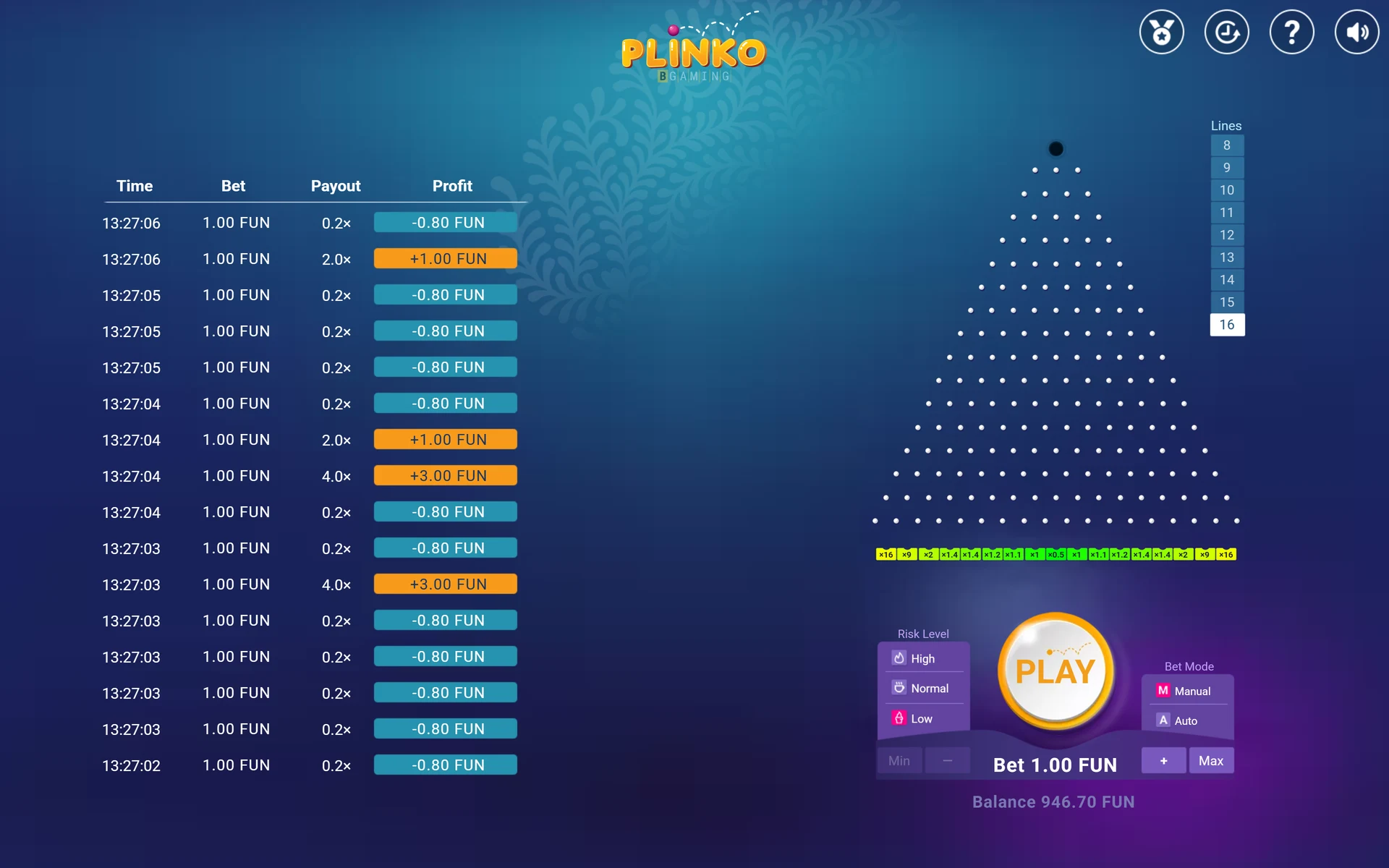
The demo on this page is the official free-play build of BGaming's Original Plinko, running entirely on virtual credits. It is not Plinko 2, not the Stake or Hacksaw variants, and not an arcade or TV-style board. When the frame loads you will see the triangular peg board, a balance counter showing FUN credits, and a control panel below or beside the board.
FUN credits are denominated so that 100 minor units equal one credit, which matters when you read small balances or fractional payouts. Because the credits cannot be deposited, withdrawn or exchanged, the demo is free virtual-only play rather than a funded casino product. In Australia, the ACMA lists online casinos among the services that are illegal for providers to offer to people in Australia, and prohibited services cannot be advertised. Practising on a virtual-credit demo is a different activity from playing for money, and this guide keeps the two clearly separated.
If you want the rules of the paid game explained in full before you experiment, the how to play Plinko guide covers the same controls in more detail.
- Scroll to the demo frame on this page and wait for the loading bar to finish.
- Confirm the balance reads in FUN credits, not dollars.
- Check the Lines setting and the Risk Level before touching the stake.
- Press Play once in Manual mode to watch a single drop settle.
Read the settings before pressing Play
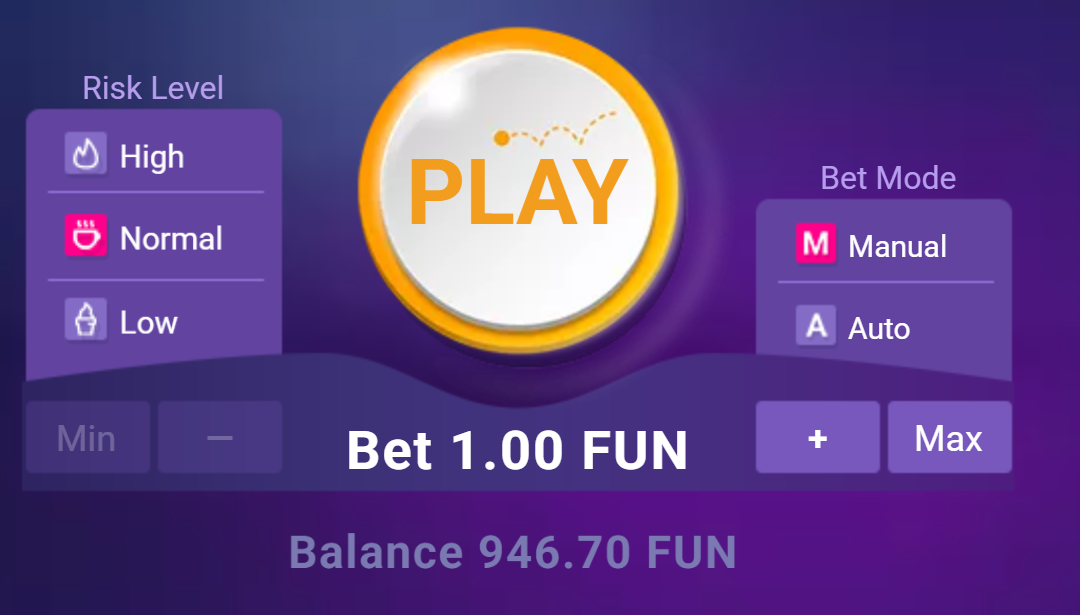
Four controls decide what happens on every drop. Lines selects the row count, which the official rules and current interface allow from 8 to 16. The research behind this site deliberately fixes 16 rows so results stay comparable, and at 16 rows the board has 17 pockets indexed 0 to 16. Risk Level offers Low, Normal and High. Changing risk changes the payout multipliers printed on the pockets, not the path probabilities of the ball.
The stake control uses minus and plus buttons plus Min and Max shortcuts. Bet Mode switches between Manual, where each press of Play drops one ball, and Auto, where you set a number of bets and the game runs them with a Stop button available. One caution: multiple moving balls on screen can be separate drops that have already settled, and the animation may lag behind the balance. Always read the balance, not the balls, to know what has actually been paid.
Settlement is simple multiplication. Stake times multiplier equals payout, and payout minus stake equals net. At 2 FUN staked, a 0.5 pocket returns 1 FUN for a net of minus 1 FUN, while a 9 pocket returns 18 FUN for a net of plus 16 FUN. The Plinko odds page lists the full multiplier ladders for each risk level at 16 rows.
What risk level actually changes
At 16 rows the landing probabilities follow a binomial distribution: the centre pocket holds about 19.64 per cent of drops, while the two extreme edge pockets combined are a 1 in 32,768 event; each single edge is 1 in 65,536. Low, Normal and High keep that same shape but stretch the payouts. Low tops out at 16 times stake, Normal at 110 times, and High at 1000 times, with the High ladder paying just 0.2 across the five centre pockets. The theoretical return sits near 99 per cent on all three, so risk level is a choice about volatility, not about which setting is looser.
| Risk Level | Centre pocket | Edge pocket | Max multiplier |
|---|---|---|---|
| Low | 0.5x | 16x | 16x |
| Normal | 0.3x | 110x | 110x |
| High | 0.2x | 1000x | 1000x |
Try a ten-drop worksheet
Unstructured clicking teaches very little, so run a fixed worksheet instead. Set Lines to 16, choose one Risk Level, set the stake to 1 FUN and play exactly ten Manual drops. After each drop write down the pocket multiplier and your net for that drop, then total the column at the end. Ten drops will not prove anything about the game, but the exercise forces you to read settlement properly and notice how often small multipliers cluster near the centre.
Repeat the worksheet once on each risk level and compare the feel. On Low you will see many drops near break-even; on High you should expect most drops to return 0.2 times stake, because the centre five pockets all pay 0.2 and the centre of the board is where the ball lands most often. The biggest multipliers sit on pockets the ball almost never reaches.
Once the worksheet makes sense, the best settings guide and the Plinko strategies overview explain how staking plans such as flat betting, martingale and D’Alembert behave mechanically, and the results page lets you evaluate how historical configurations actually performed rather than assuming a pattern will continue.
- Set Lines to 16 and Risk Level to Low.
- Set the stake to 1 FUN and play ten Manual drops.
- Record multiplier and net for each drop in a notebook or spreadsheet.
- Repeat on Normal and High, then compare totals and how each session felt.
If the frame does not load
Demo frames fail for ordinary technical reasons more often than for anything exotic. Start with a full page refresh, then try a hard refresh that bypasses the cached copy of the page. If the frame still shows blank, open the page in a different browser or in a private window, which rules out extensions such as aggressive ad blockers and script filters that commonly block embedded game frames.
On mobile, switch between Wi-Fi and mobile data, because some networks filter game content at the network level. Also check that your browser allows third-party content on this page and that any content blocker you run is paused for this site. If none of that works, the provider's demo server itself may be temporarily unavailable, in which case waiting and trying later is the realistic fix.
While you wait, the Plinko simulator lets you practise the same settlement maths and staking rules without the embedded frame, so a broken demo does not have to end the session.
- Refresh the page, then hard refresh to bypass the cache.
- Try a private window or a second browser.
- Pause ad blockers and script filters for this site.
- Switch network on mobile, then retry later if the provider server is down.
Demo, simulator and other versions
Three things get called Plinko practice and they are not interchangeable. The provider demo on this page is the real BGaming game running on FUN credits, with the provider’s displayed controls and payout tables; we did not test a funded operator build. A simulator is a separate tool that reproduces the maths, useful for running thousands of drops quickly and testing staking rules, but it is not the game itself. Other versions, including Plinko 2, the Stake and Hacksaw builds and various arcade apps, use different boards, multipliers and sometimes different mechanics entirely, so habits learned there may not transfer.
Forum players often ask about tactics such as raising stakes after a run of low 0.2 returns, tapping the board several times per drop, or changing the seed to end a long drought without a 1000x hit. These are international community questions, not proven winning methods. Drops are modelled as independent events, so past outcomes do not make the next pocket predictable, and a seed hash shown after the fact is not the unrevealed seed or a forward prediction. Use the demo to learn controls and the maths, and treat any claimed pattern as something to test rather than trust.
For a broader look at how virtual-credit play, ad-reward apps and funded casino products differ, the Plinko apps guide keeps those categories separate, which matters because advertising must not mislead about features, price or what is actually being offered.
Questions about Plinko
Is the Plinko demo free to play?
Yes. The BGaming Original Plinko demo runs on FUN virtual credits that have no cash value and cannot be deposited, withdrawn or exchanged. You can drop as many balls as you like without spending real money.
What do the Risk Level settings change?
Risk Level changes the payout multipliers on the pockets, not the ball's landing probabilities. Low caps at 16x, Normal at 110x and High at 1000x, with High paying just 0.2x across the five centre pockets at 16 rows.
Does the demo have stop-loss or take-profit in Auto mode?
The observed Auto controls expose a number-of-bets count and a Stop button. Native stop-loss or take-profit controls were not observed in this build, so do not rely on the game to halt at a profit or loss target automatically.
Can I win real money in Plinko demo mode?
No. Demo mode pays only FUN virtual credits, which carry no cash value. It is a practice environment for learning controls, settlement maths and how each risk level behaves over repeated drops.
Why does my balance change before the ball lands?
Multiple moving balls can be separate drops that have already settled, and the animation may lag behind the balance. Read the balance counter rather than the balls on screen to know what each drop actually paid.